
Getting your business online starts with one essential element: a domain name. This digital address serves as your home on the internet, making it easy for customers to find and remember you. Instead of typing complicated strings of numbers, visitors can simply enter your memorable domain name to reach your website.
- Get a domain name — your unique web address (like yourname.com) that people type to find you
- Choose wisely — keep it short, avoid hyphens/numbers, prefer .com when possible
- Register it — use registrars like Namecheap, GoDaddy, or hosting companies like Hostinger ($10-15/year)
- You’re leasing, not buying — renew annually or lose it
- Then get hosting — where your website files actually live, bought separately from the domain
What Is the Domain Name System (DNS)?
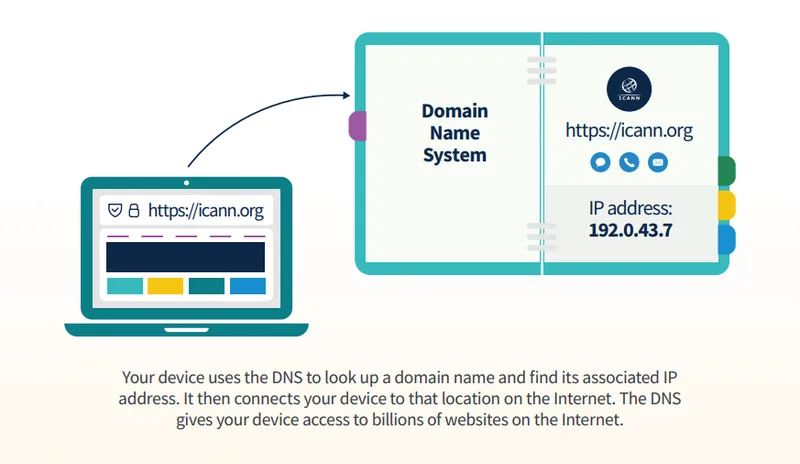
The Domain Name System acts as the internet’s phone book, translating human-friendly website addresses into computer-readable IP addresses.
Here’s how it works: When you type a website address into your browser, your computer doesn’t inherently know where that site lives. It needs the site’s IP address; a unique set of numbers like 192.168.1.1 that identifies a specific server on the internet.
Your computer queries a DNS resolver, typically operated by your internet service provider, which retrieves the corresponding IP address from an authoritative server. The resolver sends this information back to your browser, which then connects to the correct location and loads the website. This entire process happens in milliseconds.
Every device on the Internet has a unique address called an Internet Protocol (IP) address. IP addresses can be hard to remember. The DNS makes using the Internet easier by allowing a text-based domain name to be used instead of the IP address.
— ICANN
Why Does Your Business Need a Domain Name?
A domain name does three things for a business.
Professional brand identity
Your domain name serves as your unique identifier online, helping customers locate and remember your business. Whether you choose your personal name, company name, or a creative brand name, your domain becomes synonymous with your identity.
Custom business email
A domain name enables professional email addresses that reinforce your brand credibility. Instead of using generic free email services, you can create custom addresses that make a stronger impression on clients and partners.
Also Read: How to Get A Custom Free Business E-mail in 2026
Trust and credibility
A dedicated domain name establishes you as a legitimate, professional entity. This differentiates you from free subdomain services and signals to visitors that you’re serious about your online presence.
There is a defensive reason to prefer a name nobody can mistype into somewhere else. Scammers build their fake storefronts on near-misses of real brand domains, e.g., an inserted hyphen, a doubled letter, an added word like "official", and the resulting address is close enough that shoppers cannot tell the fake from the real one at a glance. The harder your name is to imitate convincingly, the less of that you inherit.

How to Choose a Domain Name
Start by brainstorming potential domain names that reflect your brand, products, or services. If you need inspiration, AI-powered business name generators like logo.com can help spark ideas based on keywords related to your industry.
Once you have candidates in mind, you’ll need to verify availability.
Checking Domain Availability
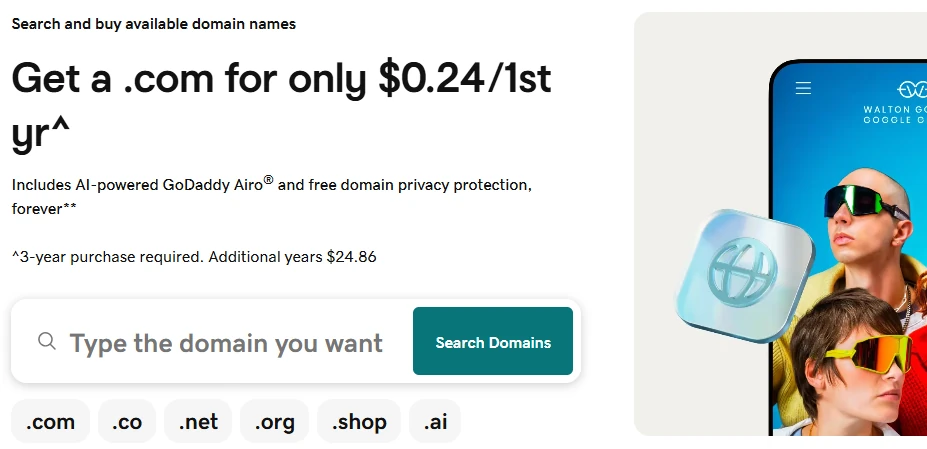
Every domain name is unique. No two websites can share the same address. Domain search tools let you quickly check whether your preferred domain name is available and which extensions you can register.
When selecting your domain, follow these best practices:
- Keep it concise and memorable. Shorter domain names are easier to recall and less prone to typos.
- Avoid hyphens and numbers. Both create confusion and are easily forgotten or mistyped.
- Prioritize familiar extensions. Common extensions like .com tend to inspire more trust among users.
You only have one shot to make a great first impression. And when you’re online, it starts with your domain name. So don’t treat it as an afterthought — spend the necessary time it takes to create a winning domain name that will help build your great brand.
— Verisign
Understanding Domain Name Extensions
Domain name extensions, also called top-level domains (TLDs), are the letters following the dot in a web address. These help users quickly understand a website’s purpose or geographic focus.
Generic Top-Level Domains (gTLDs)
These are open to anyone, anywhere, and are the safe default for most businesses. .com is still the one people type from memory. The rest either say something specific about the site, like .shop, .blog or .io, or exist as fallbacks for when the .com has gone.
Country Code Top-Level Domains (ccTLDs)
If your business primarily serves a specific geographic market, country-specific extensions can strengthen local trust:
.ke— Kenya.ca— Canada.uk— United Kingdom.au— Australia
These regional extensions signal to customers that your business caters to their specific location. Several are sold a level down rather than at the top: in Kenya the address most businesses register is a .co.ke, run by the Kenya Network Information Center, which has managed .ke since 1993.
What Each Extension Costs
Price varies far more by extension than most people expect, and on several of them the first-year number is a discount that expires. The figures below are typical prices averaged across several major registrars, so they reflect a survey of the market rather than one company’s list. Renewal prices on .co and .shop in particular varied widely between registrars, so treat those two as ballpark rather than exact. .co.ke is the exception: none of those registrars sell it, so that row still comes from Truehost Kenya.
| Extension | Suits | First year | Renews at |
|---|---|---|---|
| .com | Almost anything; the ending people guess | ~$11 | ~$18 |
| .net | A broadly trusted second choice | ~$14 | ~$20 |
| .org | Non-profits, associations, causes | ~$9 | ~$19 |
| .co | A short stand-in when the .com is taken | ~$24 | ~$40 |
| .io | Software and technology brands | ~$36 | ~$65 |
| .shop | Online stores | ~$3 | ~$38 |
| .blog | Publications and personal writing | ~$3 | ~$26 |
| .co.ke | Businesses trading in Kenya | KES 999 | KES 1,200 |
Read the gap between the last two columns, not the headline. .shop and .blog show it starkest: both get promoted down to a couple of dollars for the first year and then renew at ten times that or more. .co and .io renew markedly higher too, just without as steep a first-year discount to disguise it. .com and .net have the smallest gap between what you pay to start and what you pay to keep it, which is part of why they remain the boring correct answer. The cheapest first year is often the most expensive decade.
Do Domain Extensions Affect SEO?
All domain name extensions are treated equally by search engines from a technical SEO standpoint. Google has said so since the new gTLDs launched: keywords in a TLD give no advantage or disadvantage in search. Your website’s quality, content, and user experience matter far more than your extension choice. What an extension does influence is perception. An unfamiliar ending can make a visitor hesitate before clicking. Choose one that aligns with your brand and feels credible to your target audience.
We made that call ourselves. This site runs on a .co, not a .com, and the trade-off is worth stating plainly: a shorter, still-available name in exchange for a small permanent tax, because some people will assume the .com and type that instead. That is the real cost of a non-.com; not lost credibility so much as the occasional visitor who lands somewhere else and never tells you. If the .com of your name is parked and cheap, buy it and redirect it. If it is being squatted, often times for a ridiculous amount of money, a .co or a country extension is a perfectly respectable answer.
Does my top-level domain (TLD; for example, .com, .org, .gov, .ponies) impact my site’s performance in Google Search? No. Google’s goal is to return the best and most relevant results to people, regardless of the top-level domain.
— Google Search Central
How to Register a Domain Name
After selecting the perfect domain name, it’s time to complete your domain name registration. You can do this through a domain registrar or web hosting company. Popular domain registrars include Namecheap, GoDaddy, Squarespace Domains, and Hover. Many web hosting companies like Hostinger, SiteGround, and HostGator also offer domain registration as part of their packages.
It’s important to understand that when you register a domain name, you don’t purchase it outright; you lease it for a specific period, typically starting at one year. Think of it as renting digital real estate. If you don’t renew before expiration, your domain name becomes available for others to register.
When you register a domain name, you’re able to use it for the period of time you registered it for, which is typically between one to ten years.
— ICANN, Domain Name Renewals and Expiration

How Much Does It Cost to Register a Domain Name?
A standard .com runs about $11 the first year and roughly $18 a year to renew after that, and the table above covers what the other common endings cost to buy and to keep. Three things move the number beyond that:
- Premium or already-owned names are priced by whoever holds them, and can run to four or five figures
- Add-ons are billed separately: WHOIS privacy, premium DNS, sometimes an extra for the first year’s SSL
- The renewal, which on discounted extensions is the figure that actually matters
Many registrars include essential features like SSL certificates in their packages. SSL certificates encrypt data between your website and visitors, displaying the padlock icon in browsers that signals security and trustworthiness.
What Comes After Registration
A registered domain on its own does not put anything on screen. It is an address with nothing at it yet. Two things still have to happen: you need web hosting, the server space where your site’s files actually live, and you need to build the site itself.
Those are separate purchases from your domain, and they are where most of the ongoing cost sits. Shared hosting starts at a few dollars a month, though the advertised rate and the renewal rate are rarely the same number. Website builders like Wix and Squarespace bundle hosting into their subscription; WordPress does not.
We covered all of it in a companion guide, including what the major hosts renew at and how to pick between a builder, WordPress, and an AI tool.
Also Read: Web Hosting and Website Builders: How to Get Your Site Online
Getting Started with Your Online Presence
Getting a domain is the smallest step in building an online presence, and the one everything else waits on. Pick a name you can say out loud without spelling it, register it somewhere reputable, set it to renew automatically, and move on to the parts that take real time.
Key takeaways
- A domain name is your unique digital address that makes your website easy to find and remember
- The DNS system translates human-friendly domain names into computer-readable IP addresses in milliseconds
- Choose extensions wisely – while all are equal for SEO, familiar extensions like .com build more user trust
- Domain name registration is a lease, not a purchase – domains are registered for specific periods (typically one year minimum) and must be renewed
- Hosting is a separate purchase – your domain points visitors to a hosting server, which you buy on its own
- Set your domain to auto-renew – an expired domain can be registered by anyone else once it lapses
Frequently Asked Questions
What happens if I forget to renew my domain name?
You get a grace period, but not an open-ended one. ICANN policy requires registrars to send you “two renewal reminders approximately one month and one week before expiration”. If the name is then deleted, it “will enter into a redemption period for 30 days, under which it remains available to restore”, then “PendingDelete status for 5 days”, after which it is released first-come, first-served. Restoring it inside that window costs “an additional fee, sometimes referred to as a redemption fee”, usually several times the renewal price. Auto-renew, on a card that has not expired, avoids the whole sequence.
Will my name and address be public when I register a domain?
Less of it than there used to be. ICANN’s Registration Data Policy requires a registrar to redact personal data where the law demands it, and redaction there means the registrar “MUST NOT include the value of the data element in the RDDS output”. What survives that varies by registrar and by extension, so check what yours publishes and what it charges to hide the rest. Porkbun includes WHOIS privacy free with every domain; Truehost Kenya sells its WHOIS ID Protection for KES 400 a year.
How long before a new domain actually works?
The registration itself is close to instant. What takes time is DNS caching. Cloudflare’s DNS documentation describes the TTL field as controlling “how long each record is cached and, as a result, how long it takes for record updates to reach your end users”, and lets you set anything from 60 seconds up to one day. The familiar advice to allow 48 hours reflects long default TTLs rather than a rule. Lower the TTL on your records a day before you move hosts and the change lands in minutes.
Do I have to buy hosting from the same company that sold me the domain?
No. They are two separate services joined by one DNS record, and keeping them apart means you can change host without moving the name, or change registrar without touching the site. Buying both in one place is a convenience and nothing more. Registrars generally include the DNS control panel you need to point the name elsewhere; Porkbun’s is free with every domain and runs on Cloudflare. Our hosting guide covers what to look for on the other side of that record.
Should I register the same name on several extensions?
Buy the .com of your name if it is available and cheap, and redirect it to your real site. Past that, defensive registrations get expensive quickly and achieve less than they look like they do: no number of extensions stops someone registering your name with a hyphen inserted or the word “official” bolted on, which is how most fake storefronts are built. The money is better spent being easy to find under the one or two spellings people actually type.
Final Thoughts
It all starts with choosing and registering a domain name. Whether you’re launching a personal blog, an online store, or a professional portfolio, the principles are the same: keep it short, keep it easy to spell, and prefer a familiar extension. Then register it before someone else does, and go and sort out hosting.
Ready to Launch Your Online Presence?
Good names go fast, so it pays to move early. ClubUnbrick is not a registrar and does not resell hosting, so nothing we point you at is something we are also selling you. We help you settle on the name, then get it registered and pointed at a working site under your own account.
What We Do
- Shortlist the name with you — What is genuinely available, which extension is worth paying for, and what it renews at after the first year
- Register it in your name — The domain sits on your own registrar account, so you hold it and can move it whenever you like
- Website Development — From AI-powered builds to fully custom solutions
- DNS and email setup — Pointing the name at your site and your inbox, which is the step that most often goes wrong
Whether you’re buying your first domain or scaling an existing business, we’ll get you set up without the guesswork.