Online shopping is booming but scammers are using AI to create near-perfect fake websites that steal payments in minutes. From a testimony i read, a lady recently lost money on a purchase after clicking the top Google result, chatting on WhatsApp, and paying to a bank account paybill. The real company confirmed the site had been reported to authorities weeks earlier. The cash was gone in four minutes. Don’t let this happen to you. This guide walks you through 10 powerful website and domain checks you can run in minutes to spot fake websites, avoid scams, and protect your payment before it’s too late.
- Type the official URL manually — Never click Google ads or the first search result without verifying the exact domain spelling
- Run the URL through free scam checkers — Google Safe Browsing, VirusTotal, ScamAdviser, and F-Secure catch most fakes instantly
- Check domain age with WHOIS — New domains (under 6–12 months) are high-risk; legitimate brands have years of history
- Verify phone numbers with Truecaller and check Google Business Profile for verified listings and real reviews
- Insist on official email and invoice — Real companies use branded @company.com emails, not Gmail or WhatsApp-only contact
- Use AI-powered browser protection — Chrome Enhanced Protection and Avast Scam Detector catch AI-generated fake sites automatically
Why Fake Websites Fool Shoppers
Scammers build sites that look real. They copy logos and product photos, mimic brand domains with slight spelling changes, and push buyers to pay by fast, hard-to-reverse methods like mobile pay or bank transfers. Many victims click the first search result without checking if it’s the official site. In a case study, the fraudster used WhatsApp and a familiar payment path to create urgency and trust. The victim paid, and the money was withdrawn in minutes.
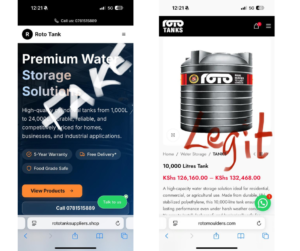
Real-Life Case: The Roto Tank Scam
Here’s what happened step by step:
- Victim clicked the first Google search result for the brand
- Followed a WhatsApp link and shared delivery details
- Payment requested via paybill by ABSA
- Seller promised delivery within hours
- After payment, seller demanded a “delivery fee” despite the website stating free delivery
- Buyer contacted the real company and learned the site was fake and was already reported two weeks earlier
- Funds were withdrawn in under four minutes
Immediate Red Flags to Watch For
- Payment through unusual channels — Unknown paybill numbers, instant bank transfers, or cryptocurrency requests
- Only one contact method — WhatsApp-only, with no official company email or phone number listed
- Pressure to pay quickly — “Limited stock,” “offer expires in 1 hour,” or promises of instant delivery
- Inconsistent titles and messaging — Someone claiming to be “Head of Sales” but using casual, unprofessional language
- Extra fees after payment — Sudden “delivery fees,” “clearance charges,” or “refundable deposits” that weren’t mentioned upfront
Verify the Website URL Manually: Type the retailer’s official URL directly into your browser to avoid phishing sites that use misspelled or look-alike domains.
Also Read: How to Get A Custom Free Business E-mail in 2026
10 Powerful Website & Domain Checks to Spot Fake Websites
Before you buy, run these checks. Most take under five minutes and can stop a scam before you lose money.
1. Type the Official URL Yourself
Never click Google ads or the first result. Manually type the brand’s official domain (e.g., “brandname.com”) and compare every letter. Scammers use slight misspellings like “roto-tank.com” instead of “roto.com” or add extra words like “official-roto.com.” If the URL doesn’t match exactly, it’s probably fake.
2. Run the URL Through Free Scam Checkers
Paste the link into these free tools to get instant red flags:
- Google Safe Browsing — transparencyreport.google.com (flags malware and phishing instantly)
- VirusTotal — virustotal.com (scans URLs across 70+ antivirus engines)
- ScamAdviser — scamadviser.com (trust score based on domain data and user reports)
- F-Secure Online Shopping Checker — AI-powered scam detection for shopping sites
Any red flags or low trust score? Close the tab immediately.
3. Check Domain Age & History with WHOIS
Go to who.is or whois.com and enter the domain. Check the registration date. New domains (registered less than 6–12 months ago) are high-risk. Legitimate brands have domains registered for years. Also check the registrar and owner details — privacy-protected WHOIS records can be suspicious for new sites.
Then visit archive.org (Wayback Machine) and search the domain. Real brands have years of snapshots showing how their site evolved. If there’s no history or the site suddenly appeared recently, it’s likely fake.
Another useful tool for checking a website’s authenticity is a WHOIS database. A domain’s WHOIS record can tell you who its registrar is, how old it is, and who owns it.
4. Verify Phone Numbers with Truecaller + Google Business Profile
Search every phone number or WhatsApp contact in Truecaller to check for spam flags and user reports. Then Google the brand name and check Google My Business (Google Maps) and look for the blue verified checkmark, real customer photos, a physical address, and genuine reviews. If the business doesn’t exist on Google Maps or has zero reviews, be very cautious.
5. Insist on Official Communication Only
Legitimate companies use branded email addresses like support@company.com, never Gmail, Yahoo, or Outlook. If the only contact method is WhatsApp or a generic email like “sales123@gmail.com,” that’s a major red flag. Real businesses have multiple contact channels: branded email, phone support, and often live chat on their website.
6. Check for Privacy Policy & Terms of Service
Scroll to the footer of the website. Legitimate e-commerce sites have clear links to Privacy Policy, Terms of Service, Refund Policy, and sometimes a business registration number. Click these links and check if they’re real, detailed policies with the company’s physical address and legal information. If the footer is empty or the policies are generic copy-paste text with no real details, it’s likely a fake site.
7. Hover Over Every Link & Button
Before clicking “WhatsApp Chat” or “Pay Now,” hover your mouse over the button and check the actual URL in the bottom-left corner of your browser. The link should match the brand’s domain. If it redirects to a different domain, a shortened link (bit.ly, tinyurl), or a suspicious site, exit immediately.
8. Click the Padlock for SSL Certificate Details
Click the HTTPS padlock in the address bar and view the certificate. The certificate should show the exact company name and be issued by a trusted authority like Google Trust Services, DigiCert, or Let’s Encrypt.
Important: HTTPS and a padlock are required, but they’re not proof of legitimacy on their own. Scammers can get free SSL certificates easily. Always check who the certificate was issued to.
The fastest way to check a website’s legitimacy is run through a few quick checks: – Check the URL and make sure the domain spelling matches the brand and isn’t a look-alike. – Look for HTTPS and the padlock… – Use Google Transparency Report by pasting the URL into Safe Browsing to see if Google has flagged it as unsafe.
9. Spot Poor Quality & Pressure Tactics
Scam sites often have these telltale signs:
- Bad grammar and spelling errors throughout the site
- Blurry or low-quality product images (often stolen from real sites)
- Missing “About Us” or “Contact Us” pages
- Unrealistic discounts like “90% off” or “limited time only”
- Sudden “refundable delivery fee” demands after payment
- Countdown timers creating fake urgency
Real, professional sites look polished, have high-quality images, and never rush you into paying.
10. For Large Purchases; Always Ask for an Official Invoice First
Before paying, request a proper proforma invoice or official invoice with the company’s registered business name, tax ID, physical address, and contact details. Legitimate sellers send it instantly via official email. Scammers refuse, delay, or send dodgy PDFs with inconsistent information.
Free Tools Comparison
Use this table to choose the right tool depending on how deep a check you need.
| Tool | What It Checks | Pros | Cons | Best For |
|---|---|---|---|---|
| Google Safe Browsing | Malware, phishing flags | Instant flagging, trusted by Chrome | No deep domain metadata | Quick safety check |
| VirusTotal | Malware, scripts, reputation | Multi-engine scanning (70+ sources) | Too detailed for basic users | Detect hidden malware |
| WHOIS Lookup | Domain age, registrar, owner | Shows domain history | Records can be privacy-protected | Verify domain age |
| ScamAdviser | Trust score, domain data | Easy-to-read trust rating | Sometimes rates new legit sites low | Quick trust score |
| Sucuri SiteCheck | Malware, blacklisting | Site vulnerability scan | Less focus on social signals | Security-focused scan |
| Web of Trust (WOT) | Community ratings | Browser warnings, real user feedback | Subjective user reviews | On-the-fly shopping checks |
Extra AI-Powered Protection
Modern browsers and security tools now use AI to catch fake sites automatically. Here are the best options:
- Chrome Enhanced Protection — Powered by Google’s AI, it warns you about suspicious sites in real time (enable it in Chrome Settings → Privacy and Security)
- Avast Scam Detector — Free browser extension that uses AI to flag AI-generated fake sites
- F-Secure Online Shopping Checker — AI-powered tool specifically designed for e-commerce scam detection
- Microsoft Edge SmartScreen — Built-in AI protection that blocks phishing and malware sites
What to Do If You Think You Were Scammed
If you’ve already paid, act quickly. Contact your bank or payment provider, report to the police, and collect all messages and screenshots. In many cases, funds moved by mobile pay or instant bank transfers are hard to recover, but reporting fast increases your chances and helps take the fake site offline.
Immediate Recovery Steps
- Contact your bank immediately — Explain the transaction, provide timestamps, screenshots, and paybill/account numbers. They may freeze the transaction or guide you on next steps
- Report to local police — File a report with your local police station or cybercrime unit. Provide the fake URL, screenshots, WhatsApp chats, and transaction details
- Report the fake site to Google Safe Browsing — Go to safebrowsing.google.com/safebrowsing/report_phish and submit the URL. Google will warn other users or block it worldwide
- Inform the real brand — Contact the legitimate company so they can track and report the duplicate site
- Change your passwords — If you shared login credentials or personal data, change passwords immediately for email, banking, and any other accounts
How to Report & Flag Scam Websites
Reporting helps others avoid the same scam and gets the site taken down faster. Here’s where to report:
- Google Safe Browsing — safebrowsing.google.com/safebrowsing/report_phish
- VirusTotal — Submit the URL for scanning and community flagging
- Internet Crime Complaint Center (IC3) — ic3.gov (for US-based scams)
- Action Fraud (UK) — actionfraud.police.uk
- econsumer.gov — For cross-border international scams
- Your local cybercrime authority — Most countries have national cybercrime reporting centers
Key Takeaways
- Always type a brand URL directly into your browser. Never trust the first Google result without verifying
- Use free tools like Google Safe Browsing, VirusTotal, WHOIS, and ScamAdviser for instant scam checks
- Check domain age — Legitimate brands have domains registered for years, not weeks
- Verify phone numbers with Truecaller and check Google Business Profile for verified listings
- Insist on official branded email and a proper invoice before paying
- Enable AI-powered browser protection like Chrome Enhanced Protection to catch AI-generated fakes automatically
Also Read: How to Choose and Register a Domain Name in 2026
Final Thoughts
Scammers are getting smarter, using AI to build near-perfect fake websites. But the tools to spot fake websites are getting smarter too. A few minutes of verification can save you hours of trouble and loss of funds. If something feels off (a WhatsApp-only contact, pressure to pay fast, or a brand-new domain) stop, verify through official channels, and insist on written, verifiable terms before you pay. When possible, use payment methods that offer dispute protection, and keep records of every transaction. Stay vigilant, and shop smart.
Need Help Securing Your Online Store?
At ClubUnbrick, we help businesses build secure, scam-proof e-commerce sites that customers can trust. If you run an online store, we can audit your site, set up branded emails, add trust signals, and implement AI fraud monitoring to protect your customers and reduce chargeback risk.
What We Offer
- Website Security Audit — We identify vulnerabilities and remove trust gaps that make customers hesitate
- Payment & Checkout Hardening — Configure safer payment flows and dispute-friendly options to protect buyers
- Branded Email Setup — Move away from generic Gmail to professional @yourcompany.com addresses
- AI Fraud Monitoring — Automated checks to spot spoofed domains and fake listings before they damage your brand
Protect your customers and reduce chargebacks with a short security audit.