
Every website has a blog, and most of them sit there gathering dust with a last post from six months or a year ago. Having a blog is not enough. SEO blog best practices demand that you keep it alive. Search engines reward sites that publish fresh, helpful content regularly because it signals you’re an active, trustworthy source. Dormant blogs miss out on traffic and actively hurt your site’s credibility. This guide gives you ten steps to make your blog posts rank better, attract the right visitors, and convert them. Every one of them applies to posts you have already published, not just the next one you write.
- Publish consistently — Search engines favor active sites; regular posting signals authority and keeps you visible in search results
- Build topical content pillars to show expertise and group related posts
- Match keywords to user intent, and write deep, skimmable content that actually answers questions
- Optimize title tags and meta descriptions to improve click rates from search results
- Use schema markup, internal links, and image optimization for better visibility and user experience
- Prioritize mobile performance and Core Web Vitals for ranking and user satisfaction
Why Your Website Needs an Active Blog (Not Just a Blog)
Most businesses know they “should” have a blog, so they add one, write a few posts, and then stop. The blog becomes a graveyard of outdated content, sitting untouched for months. Search engines look for fresh, regularly updated content when they judge whether a site is relevant and trustworthy, so an abandoned blog does not just fail to help. It works against you.
What Happens When You Don’t Update Your Blog
Search engines crawl your site looking for signals that you’re still active and providing value. When your last blog post is from 2023, that’s a signal that your site might be stale or neglected. An inactive blog costs you five things:
- Lower crawl frequency — Google crawls active sites more often; dormant sites get checked less, meaning new pages take longer to index
- Missed ranking opportunities — Fresh content targets new keywords and captures emerging search trends you’d otherwise miss
- Weaker topical authority — Competitors publishing regularly build stronger authority signals in your niche
- Reduced organic traffic — Without new entry points, you’re relying on the same old pages to bring in visitors
- Lost trust signals — Users and search engines both interpret inactivity as a sign you’re no longer invested in helping your audience
Frequent crawling is a good sign! If we’re crawling your site a lot, it’s an indication your pages have fresh or highly relevant content that people want to find, and that our systems are recognizing that demand.
— Google for Developers, “Things to know about Google’s web crawling”

How Often Should You Actually Post?
For SEO blog best practices, the ideal frequency depends on your niche, resources, and competition. But as a baseline, aim for at least one high-quality post per week. If that’s too ambitious, commit to two per month minimum. Consistency matters more than volume. Publishing every Tuesday is better than posting three times one week and then disappearing for two months.
Different posting schedules tend to produce different results:
- 1–2 posts per month — Maintains visibility and keeps your site active in Google’s eyes
- 1 post per week — Builds momentum, increases keyword coverage, and attracts steady organic traffic growth
- 2–3 posts per week — Competitive pace for established sites looking to dominate topical niches
- Daily posting — Only necessary for news sites or highly competitive industries; most businesses don’t need this, though AI content and workflow tools have put that pace within reach of a small team for the first time
Publish as often as you can while holding the quality bar. One well-researched, helpful post per week beats five rushed, thin posts. If the writing is the bottleneck rather than the ideas, connecting your CMS to an AI assistant takes the mechanical half of publishing off your hands without handing over the publish button.

SEO Blog Best Practices
Search engines now focus on intent and expertise, not just keyword frequency. Good SEO helps your content reach the right people, which means more qualified traffic and higher conversions. The ten practices below run in rough order of leverage: the first few decide what you write and who it reaches, the last few decide whether search engines can read it once it is live. Use clear structure, reliable data, and helpful formatting so readers and machines both understand your message.
1. Build Topical Content Pillars
Group related posts around a central topic to show topical authority. This helps search engines see you as a reliable source on a subject, and it improves internal linking and discoverability.
How to Start a Pillar
- Choose a core topic you can cover in many detailed posts
- Create a long pillar page that links to supporting articles
- Use consistent headings and cross links to connect the cluster
- Fill gaps as you find them — each supporting post is another entry point into the same cluster
The case for pillars is easier to see from the other direction. Google publishes a list of questions you can answer about your own content, and answering yes to any of them is a warning sign that you are writing for the algorithm rather than a reader. One of them describes the scattered-blog problem exactly:
Are you producing lots of content on many different topics in hopes that some of it might perform well in search results?
— Google Search Central, “Creating Helpful, Reliable, People-First Content”
A pillar is the answer to that question. Ten posts that circle one subject give a reader somewhere to go next and give Google a coherent thing to rank you for. Ten posts on ten unrelated subjects give neither.
2. Match Keyword Choice to User Intent
Keywords are only useful when they match what users want. Identify whether searchers seek information, comparison, or to buy, then create content that answers their need clearly. One keyword usually maps to one intent, so a page that tries to serve all three tends to rank for none of them.
Simple Intent Checklist
- Informational — Use tutorials and explainers
- Commercial research — Use comparisons and pros and cons
- Transactional — Focus on clear calls to action and product details
Simply put: satisfying Search Intent is ultimately Google’s #1 goal.
When someone else writes the post, the intent has to reach them in writing. How to Write a Content Brief That Survives Contact With a Writer covers what that handover should settle.
3. Optimize Title Tags and Meta Descriptions
Titles and descriptions influence click-through rates. Write unique versions for each post, and place the main keyword near the start of the title. These are often the first things searchers see. Make them count.
Best Practice Reminders
- Aim for roughly 55 to 60 characters in the title; long enough to describe the page, short enough to survive truncation on a phone
- Keep meta descriptions to about 120 to 160 characters
- Write for humans, not search engines
- Include your target keyword naturally, near the start
Those numbers are conventions, not rules, and it is worth knowing why they exist. Google does not impose a character limit; the display does:
While there’s no limit on how long a <title> element can be, the title link is truncated in Google Search results as needed, typically to fit the device width.
— Google Search Central, “Influencing your title links in search results”
So the target is not a character count, it is a title that still makes sense after the tail is cut off. Front-load it. Getting this right is the cheapest traffic gain available, because the top result takes a disproportionate share of the clicks:
The #1 result in Google’s organic search results has an average CTR of 27.6%.
4. Write Deep, Skimmable Content
Depth matters more than repeating the same words. Provide clear answers, examples, and a logical flow. Make content easy to scan by using headings, short paragraphs, and bulleted lists. Depth is not length: cover the subtopics a reader actually needs and stop, rather than padding to reach a word count.
Formatting Tips
- Use H2 and H3 headings that match likely questions
- Keep paragraphs short for mobile readers (40–60 words max)
- Use lists to highlight steps, features, or benefits
- Break up text with images, tables, or blockquotes
Word-count targets are the most persistent myth in blog SEO, and Google lists chasing one as a symptom of writing for the algorithm:
Are you writing to a particular word count because you’ve heard or read that Google has a preferred word count? (No, we don’t.)
— Google Search Central, “Creating Helpful, Reliable, People-First Content”
5. Target Featured Snippets and AI Answers
Structure some content as concise answers, bulleted lists, or step-by-step guides. This increases the chance of appearing in featured snippets and AI-generated answers from tools like Google’s AI Overviews. The answer has to stand on its own as a paragraph that only makes sense after the two above it rarely gets lifted.
Quick Layout for Snippets
- Begin with a short, clear answer to the question (40–60 words)
- Follow with a short list or table for clarity
- Add supporting details below the short answer
Also Read: How Google AI Overviews are Changing SEO (2026 Guide)
6. Use Schema Markup for Blogs
Schema helps search engines understand content type. For blog posts, use article schema, and add FAQ or HowTo schema when relevant to increase rich result eligibility. This structured data helps Google pull your content into AI-powered features and rich snippets.
Where to Add Schema
- Article schema on the main post page
- FAQ schema for common questions on the post
- HowTo schema for step-by-step guides
- Date modified schema to signal when you update an old blog post, moved only when the content has really changed
Structured data is a standardized format for providing information about a page and classifying the page content; for example, on a recipe page, what are the ingredients, the cooking time and temperature, the calories, and so on.
— Google Search Central, “Intro to How Structured Data Markup Works”
7. Internal Linking Strategy
Internal links guide users and search engines through your topical clusters. Link from supporting posts to pillar pages and from pillar pages to deep articles, using clear anchor text. The links that do the most work are often the ones added to older posts after the fact, since those pages already have authority to pass along.
Internal Linking Best Practices
- Link to 2–5 related posts within each new article
- Use descriptive anchor text (not “click here”)
- Update older posts to link to new, relevant content
- Create a linking habit: every new post should connect to at least one pillar page
There is no number to hit here. Google’s own link documentation says “there’s no magical ideal number of links a given page should contain”, and adds that if you think it is too many, it probably is. What it does set is a floor:
Every page you care about should have a link from at least one other page on your site.
That floor is worth auditing for. A post nothing links to is a page Google has to find some other way, and it is usually the post you forgot you published. Google’s test for the anchor text itself is just as blunt: read the link text on its own, and if you cannot tell what the page is about, rewrite it.
8. Image Optimization and Media
Optimize images for speed and accessibility. Use descriptive file names, add alt text that explains the image, and serve scaled images to reduce loading time. Every blog post should include at least one high-quality image; it improves engagement and gives you another opportunity to rank in image search.
Image Optimization Checklist
- Compress images while keeping quality acceptable (use tools like TinyPNG or ImageOptim)
- Use WebP or next-generation formats when possible
- Provide captions and alt text for context and accessibility
- Use descriptive file names before uploading (e.g., “domain-registration-guide.jpg” not “IMG_1234.jpg”)
9. Mobile Performance and Core Web Vitals
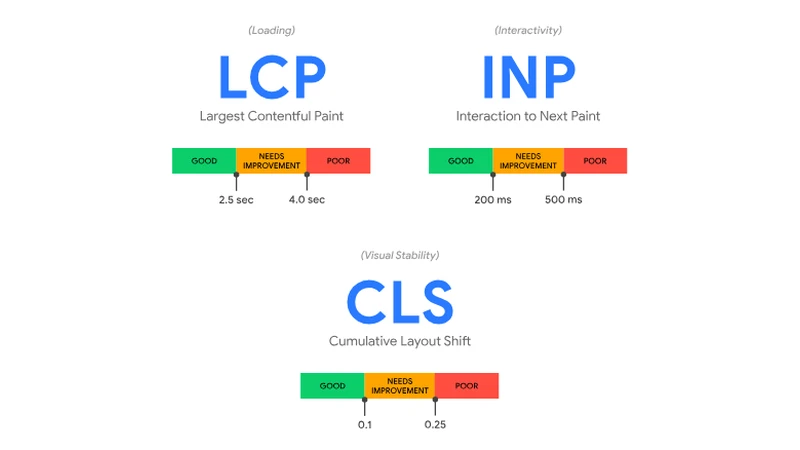
SEO blog best practices also include having fast, stable pages because they matter for ranking and user satisfaction. Measure loading performance, visual stability, and input responsiveness, and prioritize fixes that reduce real-world friction.
What to Measure
- Largest Contentful Paint (LCP) — Loading time for the main content (aim for under 2.5 seconds)
- Cumulative Layout Shift (CLS) — Visual stability to avoid unexpected shifts during load
- Interaction to Next Paint (INP) — Responsiveness when users tap or scroll
Those thresholds are not scored one page load at a time, either. They are measured across your real visitors:
To ensure you’re hitting the recommended target for these metrics for most of your users, a good threshold to measure is the 75th percentile of page loads, segmented across mobile and desktop devices.
What Auditing Our Own Site Turned Up
We relaunched this website in August 2026 and ran Lighthouse on the new homepage expecting a good score. Mobile Performance came back at 42, with an LCP of 6.9 seconds. That is a bad number for a site that had just been rebuilt as static HTML on purpose.
The report named the cause on the first screen: one animated background script on the hero. It costs a real phone almost nothing, which is why nobody had flagged it, and costs a great deal in the test environment, which is where the score comes from. Loading it after the page has painted, and skipping it entirely where it runs slowly, fixed the score. Real visitors still get the animation.
Two things to take from that:
- Measure your own pages before you optimize anything. We would have spent that afternoon compressing images, which were not the problem
- Read which file the report blames. “The site is slow” is almost never true. One script usually is, and the report names it
Server response time is spent before your page begins rendering at all, so the hosting plan underneath the site decides how much of your LCP allowance is already gone by the time the first byte arrives.
10. Technical SEO Fundamentals
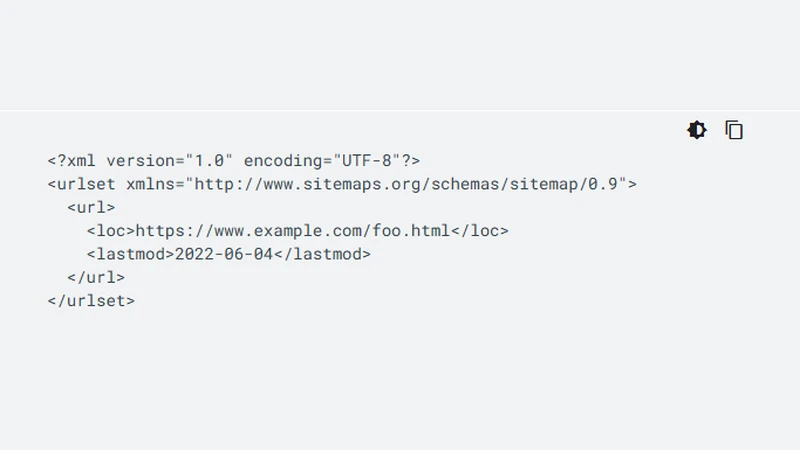
Ensure crawlability, use semantic HTML, and add canonical tags to prevent duplicate content. Keep an XML sitemap and robots file up to date so search engines can index your best pages.
Technical SEO Checklist for Blogs
- Submit your XML sitemap to Google Search Console and Bing Webmasters
- Use canonical tags to avoid duplicate content issues
- Ensure your site is crawlable (check robots.txt)
- Fix broken internal and external links regularly
- Use HTTPS across your entire site
A submitted sitemap doesn’t mean the pages in it are indexed. Check them one at a time; Why Isn’t My Page Indexed? A Search Console Diagnostic walks through reading each status.
All of this assumes the address itself is settled. If you are still at that stage, choosing and registering the domain is the decision everything above sits on, and the hardest one to reverse later.
Comparison: Title Tag, Meta Description, and Headings
This table compares three essential on-page elements, so you can prioritize work on posts that need the most improvement.
| Element | What It Does | Character Limit | Impact on SEO | Best For |
|---|---|---|---|---|
| Title Tag | Appears in search results and browser tabs | No hard limit; ~55–60 survives truncation | Directly affects CTR and relevance signals | Improving click-through rate from search |
| Meta Description | Snippet text shown in search results | No hard limit; ~120–160 typical | Influences CTR (Google may rewrite it) | Increasing clicks from search results |
| Headings (H2, H3) | Organize content and improve scannability | No strict limit (keep concise) | Helps featured snippets and AI answers | Making content scannable and fragmentable for AI |
Key Takeaways
- Publish consistently — One to two posts a month keeps a site active and crawled often; weekly is what competitive niches need
- Measure before you optimize — Run Lighthouse on your own pages first; the bottleneck is usually one file, not the whole site
- Use topical pillars to organize content and signal expertise in your niche
- Match keywords to intent, and focus on providing clear, helpful answers
- Optimize titles, meta descriptions, and schema to improve visibility in search and AI-generated results
- Improve images and mobile performance to reduce friction for readers and boost Core Web Vitals scores
Frequently Asked Questions
How often should you blog for SEO?
One well-researched post a week is a good target, and two a month is a workable floor. Consistency beats volume: Google’s crawling documentation says that if it is crawling your site a lot, “it’s an indication your pages have fresh or highly relevant content that people want to find”. A schedule you can actually hold does more for that signal than a burst of ten posts followed by six months of silence.
How long should a blog post be for SEO?
There is no target length. Google’s helpful content guidance lists “writing to a particular word count because you’ve heard or read that Google has a preferred word count” as a warning sign that you are writing for the algorithm, and answers the question in the same line: “(No, we don’t.)” Cover the subtopics a reader actually needs, then stop.
How many internal links should a blog post have?
Two to five related posts per article is a practical working range, but Google’s link documentation states there is “no magical ideal number of links a given page should contain”, and adds that if you think it is too many, it probably is. The floor matters more than the ceiling: every page you care about should have a link from at least one other page on your site.
How long does it take for a blog post to rank?
Google’s SEO starter guide says “some changes might take effect in a few hours, others could take several months”, and recommends waiting a few weeks before judging whether a change helped. A new post on a site Google already crawls often, with internal links pointing at it from day one, moves faster than the same post on a site that publishes twice a year.
Is blogging dead in 2026?
No, but the traffic shape changed. AI Overviews and chat assistants answer more questions on the results page itself, and they answer them by citing pages. A blog is how you have a page worth citing. What earns that has not changed: Google still describes “content that’s created primarily for people, and not to manipulate search engine rankings” as the thing to aim at.
Final Thoughts
None of this is one-time work. Pick the two practices above that your existing posts fail hardest; usually intent matching and internal linking, and fix those across the archive before you write anything new. Then hold whatever schedule you can actually sustain. A blog that gets one post a week plus an occasional pass over older articles will out-perform one that gets a burst of ten and then goes quiet again.
Ready to Build a Blog That Actually Ranks?
At ClubUnbrick, we help businesses turn dormant blogs into traffic-driving machines. We handle everything from SEO audits and content strategy to publishing optimized, ready-to-rank articles on a consistent schedule. Stop letting your blog gather dust.
What We Offer
- SEO Audit — Detailed site and content audit with prioritized fixes to improve rankings fast
- Content Strategy & Pillar Planning — Build topical authority with a clear roadmap and content calendar
- Technical SEO — Speed, schema, mobile optimization, and crawlability improvements
- Managed Content Publishing — We research, write, optimize, and publish SEO-ready blog posts on schedule
Work with a team that builds fast, AI-ready content for lasting search visibility and real traffic growth.